Turn Any Source into Clean, Structured Study Notes
There are two ways to make study notes badly. You can copy the source almost word for word — and end up with a wall of text you'll never revise from. Or you can ask a generic AI to “summarise” it, and get a fluent paragraph that quietly drops the detail you're actually being examined on, or invents a fact that was never in your material. A study notes generator is only useful if it does neither: it has to be structured, grounded in your source, and short enough to actually study. This guide shows how to get notes like that in about a minute.
- ✓Good revision notes are organised by concept, define their key terms, and stay tight — not a re-typed textbook.
- ✓QuizRoom builds notes only from the source you give it: it never pads them with outside facts it can't point to.
- ✓You get sections, one-line summaries, bullet points and a key-terms glossary — the raw material for flashcards and self-testing.
- ✓Notes are step one: turn the same source into a cited quiz and you've closed the loop from reading to recall.
What separates real revision notes from a summary
A summary compresses; good notes organise for recall. Decades of learning research point the same way — the notes you actually remember from share a short list of traits:
- ●Structured by concept. Distinct sections with clear headings, so you can find and rehearse one idea at a time.
- ●Key terms defined. The vocabulary you'll be tested on, pulled out and defined — the seed of a flashcard deck.
- ●Tight, parallel bullets. Notes, not sentences. Each point is one testable fact, not a paragraph to re-read.
- ●Grounded in the source. Every point traceable to your material — nothing added that a marker could call wrong.
That last point is where AI note tools fail most often and most invisibly: the notes read confidently, but a line was never in your material. QuizRoom is built to make that impossible — it writes only from what you gave it.
How QuizRoom builds your notes
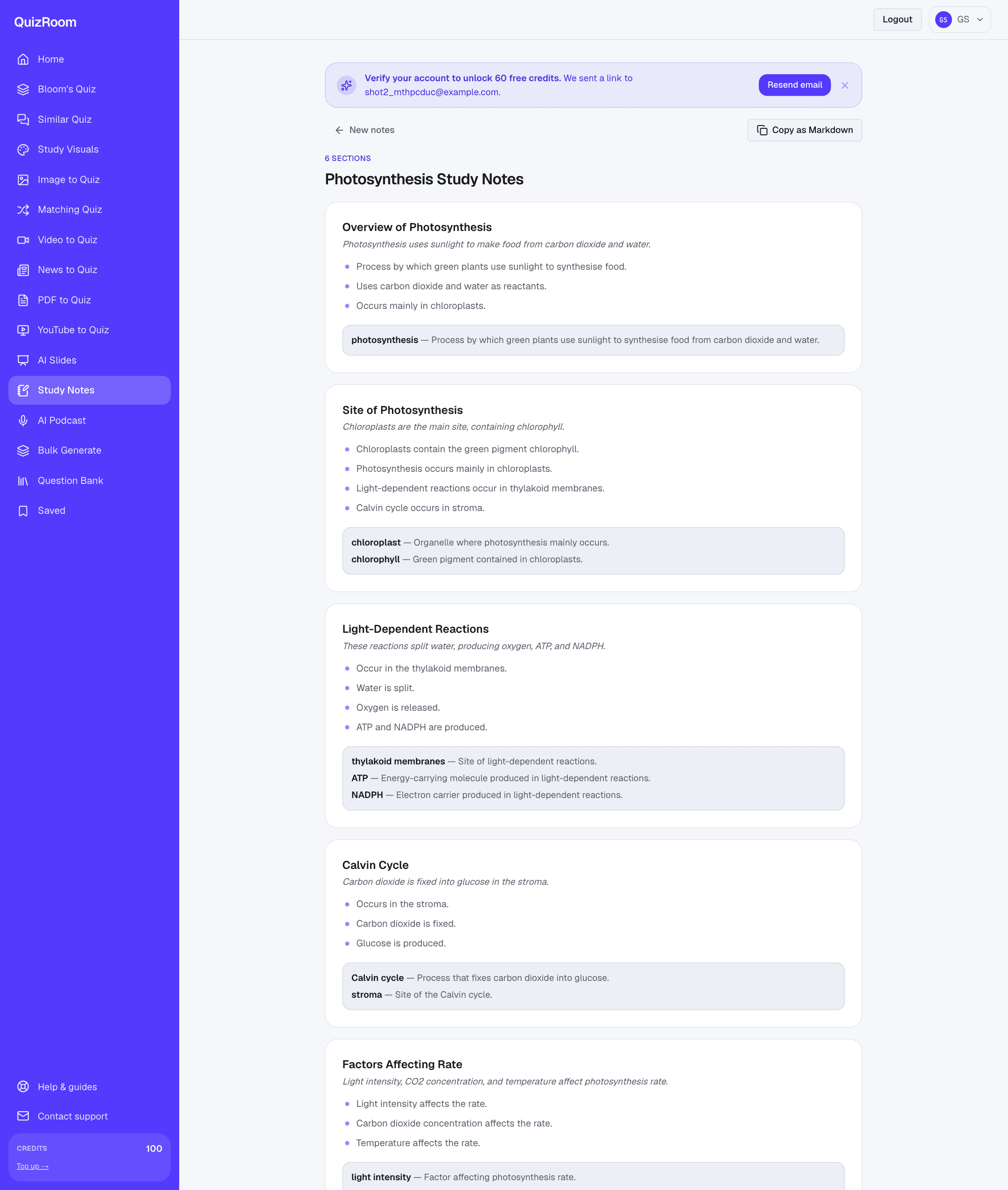
Before writing anything, QuizRoom splits your source into numbered sentences and indexes them — the same grounding engine behind its cited question generation. Every section, bullet and definition is drawn from that indexed text, so the notes follow your material's real structure instead of a generic template, and nothing is invented.
Your source is read and indexed sentence-by-sentence first — so every note points back to something you actually gave it.
Notice the shape: a title, then sections that follow the source's own logic (overview, then the process, then the factors that affect it), each with a one-line summary, a handful of bullet points, and the key terms defined. That structure is what makes notes revisable — and what a plain summary never gives you.
Make your notes in three steps
- 1Bring your source
Paste text, upload a PDF or DOCX, or drop a URL or lecture link. QuizRoom reads it and numbers every sentence.
- 2Choose how many sections
Set 3–15 sections to match the length and depth of your material — fewer for a quick recap, more for a full chapter.
- 3Review, then copy or study
Notes arrive in seconds. Copy them as Markdown into your own notes app, or keep going and turn the same source into a quiz.
The key-terms list under each section is already a flashcard deck in disguise: term on the front, definition on the back. Pair it with a quick self-test on the same source and you're revising actively, not just re-reading.
Notes are step one — turn them into a quiz
Reading notes is passive; the recall gains come from testing yourself. Because QuizRoom works from the same indexed source, you can move straight from notes to a cited MCQ set — each question tied back to the sentence it came from, so you're checked against your own material, not a model's guess. Notes to self-test in one place, no re-uploading.
| Generic AI summary | QuizRoom study notes | |
|---|---|---|
| Structure | One flowing paragraph | Sections, bullets, key terms |
| Grounding | May add or drift from facts | Only from your indexed source |
| Ready to study | Re-read, hope it sticks | Glossary + straight into self-testing |
Is the study notes generator free?
Yes — new accounts get 60 free credits after a one-tap email verification, enough to make notes from several sources before you decide to top up.
Will the notes add facts that weren't in my material?
No. QuizRoom writes only from the source you provide, working off its indexed sentences — so the notes stay grounded in what you gave it, not the model's outside knowledge.
What sources can I turn into notes?
Paste text, upload a PDF, DOCX, TXT or Markdown file, or drop a web URL or lecture link — the same inputs QuizRoom accepts for quizzes.
Can I export the notes?
Yes — copy the whole set as clean Markdown in one click and paste it into Notion, Obsidian, Google Docs or any notes app.
How is this different from making a quiz?
Notes organise the material for reading and review; a quiz tests recall. QuizRoom does both from the same source, so you can go notes → self-test without starting over.
Turn your first source into study notes
Paste a chapter or article and get structured, source-grounded revision notes in about a minute. Free with 60 credits.
Start free — 60 creditsInstructional designer focused on retrieval practice and item quality. Writes QuizRoom's guidance on distractor design, Bloom's alignment and question validity.