How to generate multiple-choice questions you can actually defend
A multiple-choice question is only as good as the two things most generators get wrong: the distractors (the wrong options) and the evidence behind the key. Get the distractors wrong and the item is either trivially easy or unfairly tricky. Skip the evidence and you can't answer the one question every teacher eventually hears — “why is this the right answer?” This guide shows how to generate MCQs that survive that question.
- ✓Good MCQs are defined by their distractors, not their stems — aim for wrong answers a half-prepared student would pick.
- ✓Every question should trace to a specific source sentence; if it can't, it shouldn't ship.
- ✓Blueprint by cognitive level (Bloom's) before you generate, not after.
- ✓Review at the item level — accept, edit, or reject — rather than trusting a batch wholesale.
What makes a multiple-choice question good
Decades of item-writing research converge on a short list. A strong MCQ has a stem that poses one clear problem, one unambiguously correct key, and distractors that are plausible but defensibly wrong. The classic failure modes are easy to spot once you know them:
- ●Implausible distractors — options no informed student would choose, which turn a 4-option item into a coin flip.
- ●Grammatical giveaways — a key that agrees with the stem while distractors don't.
- ●“All of the above” padding — a crutch that rewards partial knowledge and test-wiseness.
- ●Ungrounded trivia — a question about something never actually stated in the material.
The last one is where AI generators fail most often and most invisibly: the question reads fine, but nothing in your source supports it. That's the failure a citation catches.
How QuizRoom generates and checks each MCQ
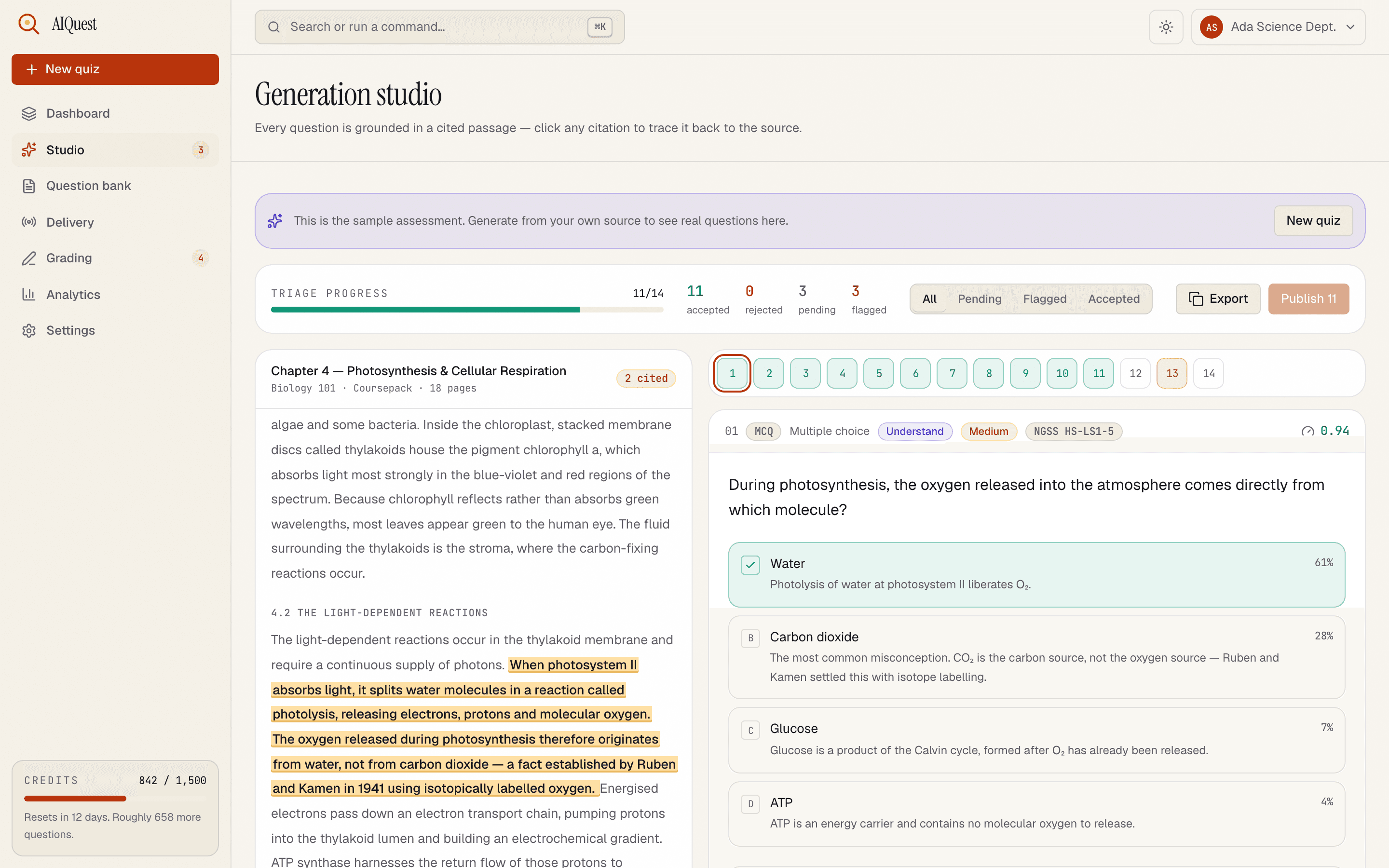
Before generating anything, QuizRoom splits your source into numbered sentences. Each question the model drafts must point back to the specific sentence(s) it was built from. A server-side check then confirms that span actually exists in your text — if it doesn't, the question is rejected, not shown. You never see a confident-looking question with an invented source.
Every question passes a citation check before it reaches you. Unbacked questions are dropped.
- 1Your source, split into numbered sentences
- 2The generated question with plausible distractors
- 3Each distractor targets a real misconception
Anatomy of a cited question: the stem, misconception-based distractors, the marked answer, and the exact source sentence it's grounded in.
Notice what the screenshot shows beyond the question itself: each distractor has a short rationale (“the most common misconception…”), the item is tagged with a Bloom's level and difficulty, and the passage that justifies the key is highlighted. That's the difference between a question you post and a question you can defend in a grade dispute.
Generate your first set in three steps
- 1Bring a source
Paste text, upload a PDF or DOCX, or drop a URL. QuizRoom reads it and numbers every sentence so each question has something to point at.
- 2Pick types, count and level
Choose MCQ (single or multiple answer), set how many, and weight the Bloom's mix — say 60% Understand/Apply, 40% Analyze.
- 3Review, then export
Questions stream in with their citations. Accept, edit or reject each, then export to QTI, Moodle XML, GIFT, AIKEN, CSV or a printable exam.
Filter to Flagged first. QuizRoom surfaces items where the model was least confident or the distractors are closest together — fixing those five takes two minutes and lifts the whole set.
Writing better distractors (the part that matters)
The best distractors come from real misconceptions, not random plausible-sounding nouns. When you review, ask of each wrong option: “who would pick this, and why?” If the answer is “nobody,” cut or replace it. QuizRoom seeds distractors from common errors in the source domain — the photosynthesis item above uses carbon dioxide as a distractor precisely because it's the textbook misconception — but your judgement on the final four is what makes the item fair.
From questions to a delivered, analysed quiz
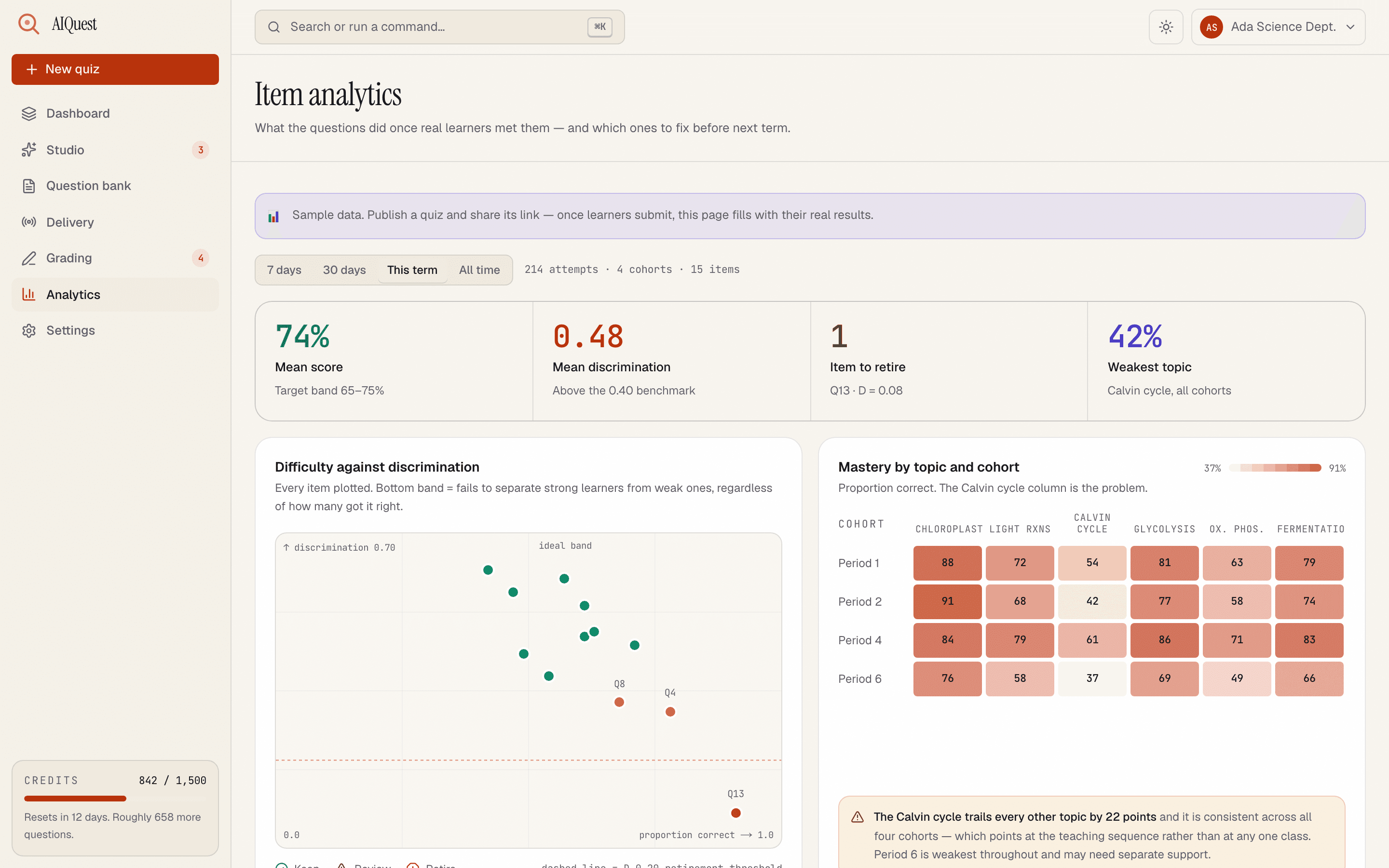
Generation is step one. Because QuizRoom also delivers and grades, you can watch how each item actually performs — its difficulty (p-value) and how well it separates strong from weak students (discrimination). A distractor nobody picks is a distractor to rewrite.
Are AI-generated MCQs accurate enough for real exams?
They can be, with review. QuizRoom constrains every question to your source and rejects any it can't cite, which removes the biggest risk — confident fabrication. You still review each item, but you're editing grounded questions rather than fact-checking invented ones.
How many MCQs can I generate at once?
Up to 500 questions per run, and every new account starts with 60 free credits (one credit per question) — no card required.
Can I control the difficulty and cognitive level?
Yes. You weight the Bloom's mix (Remember through Create) and an easy/medium/hard distribution before generating, and each item is tagged so you can rebalance a paper afterwards.
What formats can I export to?
QTI 2.1, Moodle XML, GIFT, AIKEN, Respondus, CSV (plus D2L Brightspace, Google Forms, Quizizz, Gimkit and TriviaMaker variants), JSON, Markdown, Quizlet, Word RTF, and a print-ready PDF exam with answer key — 18 formats in total.
Generate 60 cited MCQs free
Paste a source and see a defensible question — with its citation — in about a minute. No card required.
Start free — 60 creditsPhD in educational measurement. Spent twelve years building high-stakes exams for universities and professional certification boards before joining QuizRoom to work on defensible AI-generated assessment.