PDF to quiz: turn any chapter into a cited assessment
Most “PDF to quiz” tools do one of two things: they either summarise the document and quiz the summary — losing the detail you actually teach — or they hallucinate questions that sound like the material but aren't in it. This guide covers how to turn a PDF into an assessment where every question is traceable to a sentence in your file.
- ✓Extraction quality decides everything — a good pipeline keeps tables, headings and figure captions.
- ✓Grounding to the original sentence (not a summary) is what makes the questions trustworthy.
- ✓Scanned or image-only PDFs need OCR; QuizRoom handles both.
- ✓Export straight to your LMS — no copy-paste reformatting.
Why PDF extraction is the hard part
A PDF is a layout format, not a text format. Columns, footnotes, tables and figure captions are visually obvious but structurally scrambled. Cheap extractors flatten a two-column page into interleaved nonsense, then generate questions from the mess. QuizRoom reconstructs reading order, preserves tables, and numbers every recovered sentence so each question has a real anchor.
PDFs, scans and other inputs all converge on one sentence-indexed pipeline.
Turn a PDF into a quiz, step by step
- 1Upload the PDF
Drop in a chapter, paper or handout (DOCX, TXT and Markdown work too). QuizRoom extracts the text, including tables, and numbers every sentence.
- 2Choose your question mix
MCQ, true/false, short answer, matching, numeric — single type or a blend — and set the count and difficulty.
- 3Review each citation
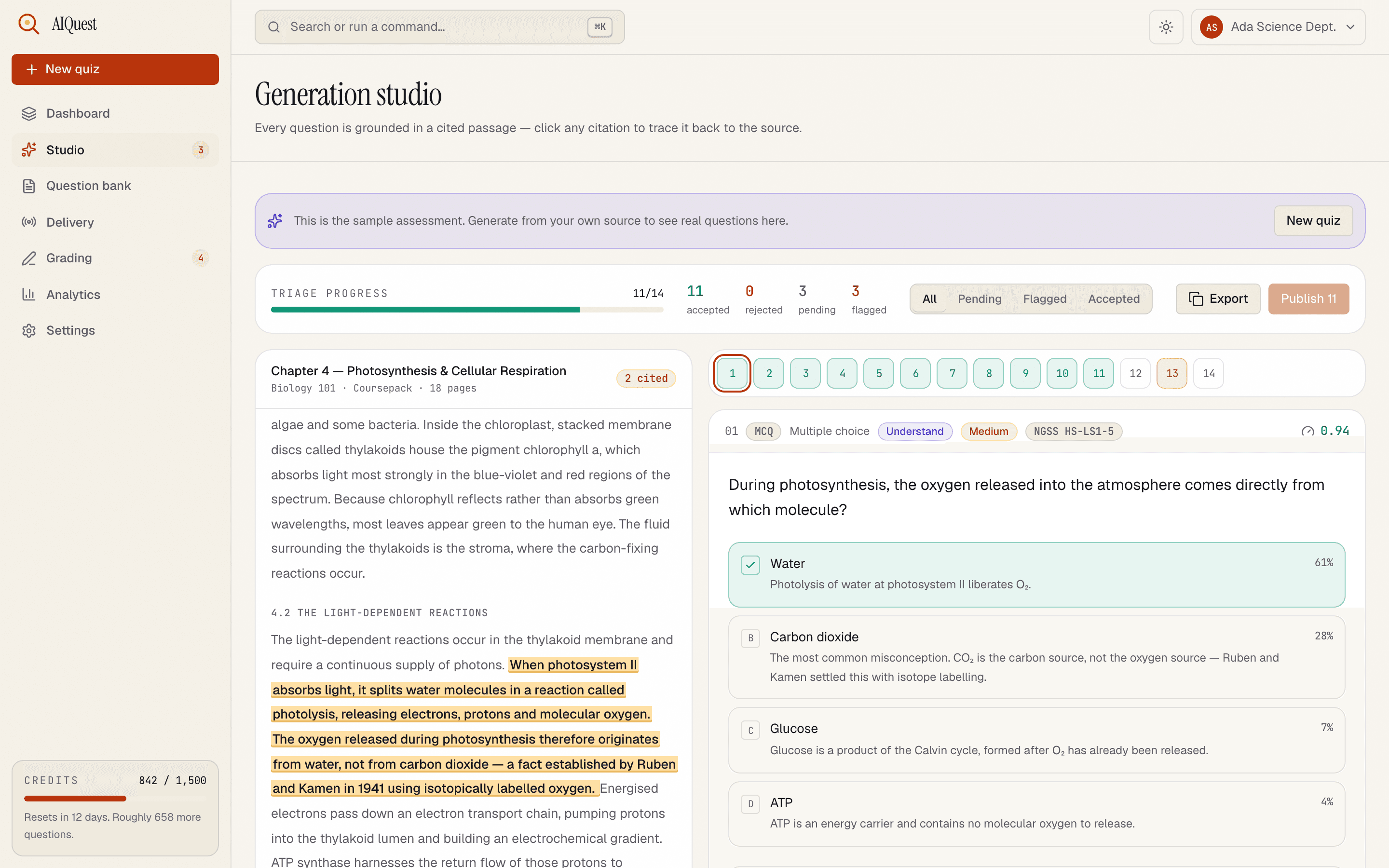
Every question shows the sentence in your PDF it came from. Skim the highlights, fix anything, reject the rest.
- 4Export to your LMS
QTI, Moodle XML, GIFT and eight more formats, or a printable exam with a key.
- 1The chapter text, sentence-indexed — tables included
- 2The question it produced from that section
- 3The cited sentence, highlighted in your source
Every question, grounded: the answer points back to the exact sentence in your file.
If your PDF is a scan (image-only), QuizRoom runs OCR automatically before indexing — so a photographed textbook chapter works the same way a born-digital one does. See the image-to-quiz guide for how OCR grounding works.
Keeping questions faithful to the source
The reason grounding matters for PDFs specifically: academic material is dense and precise. A summary-based quiz will ask about “the general idea,” but your exam needs the specific mechanism, the exact figure, the named exception. Because QuizRoom questions cite the original sentence — not a paraphrase — the detail survives, and you can verify it in one glance.
“If you can't point at the sentence a question came from, you're not assessing the reading — you're assessing the model's imagination.”
— Dr. Elena Ruiz, Assessment Lead
Organising a term's worth of PDFs
Every accepted question lands in a searchable bank, de-duplicated across runs, so a whole coursepack becomes a reusable item pool you can assemble papers from later.
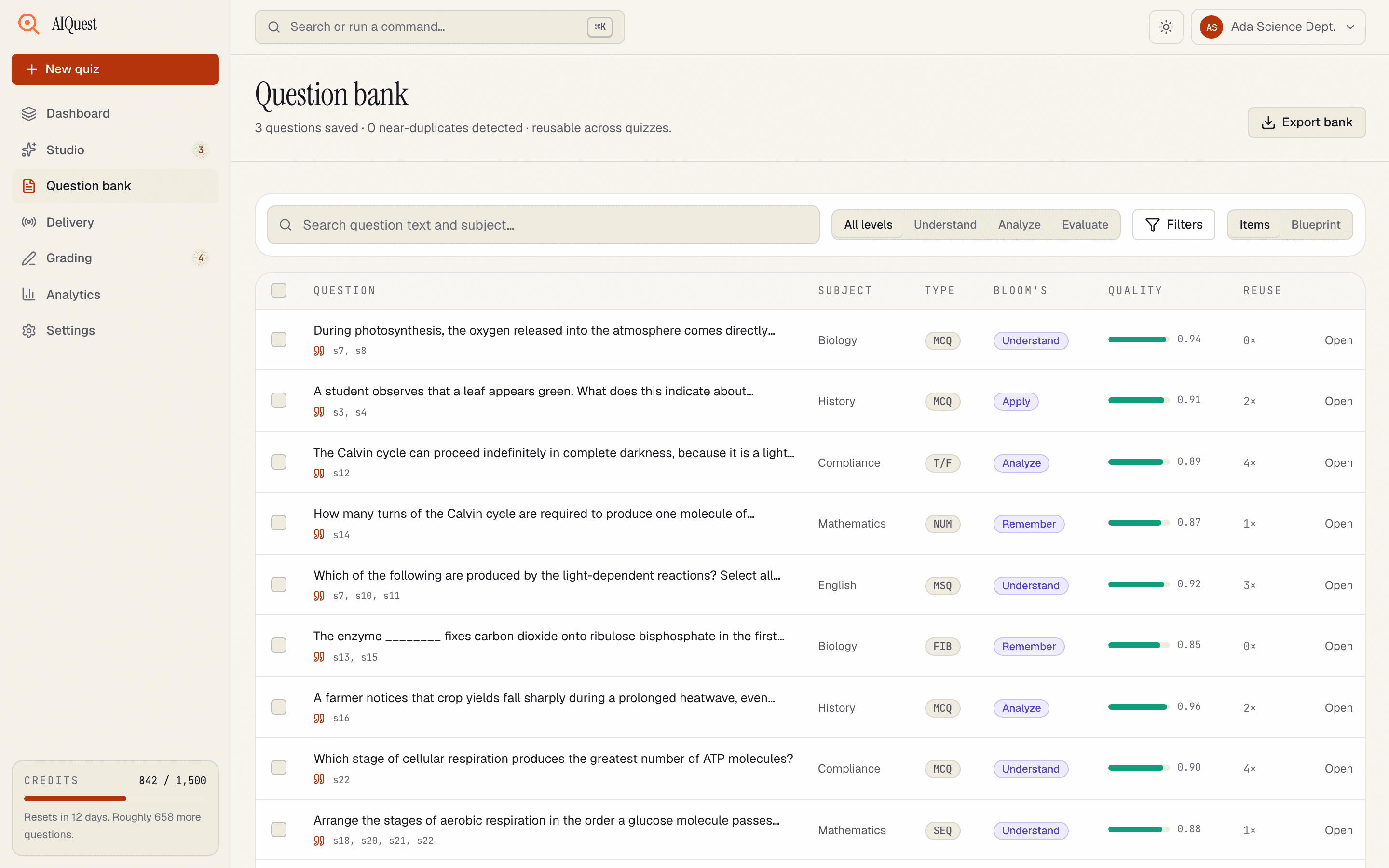
- 1Every question — cited (see s7, s8) and reusable
- 2Search & filter by text or Bloom's level
- 3Select any set → assemble a new cited paper
What file types can I upload besides PDF?
DOCX, TXT, Markdown, HTML and plain URLs, plus images, audio and video. They all run through the same sentence-indexed pipeline.
Does it work with scanned or image-only PDFs?
Yes — QuizRoom runs OCR on scanned pages automatically, then grounds each question in the recovered text.
Is my document private?
Your files are never used to train models, and you can export or permanently delete everything from your account at any time.
How large a PDF can I use?
Sources up to roughly 600,000 characters — a full textbook chapter or a long paper is comfortably within range.
Turn your first PDF into a cited quiz
Upload a chapter and get questions — each tied to a sentence in your file — in minutes. 60 free credits, no card.
Start free — 60 creditsBuilds the generation pipeline behind QuizRoom, including the citation check that rejects any question it can't trace back to your source. Previously shipped ingestion and OCR systems at two edtech companies.