Turn Any Source into a Clean Slide Deck
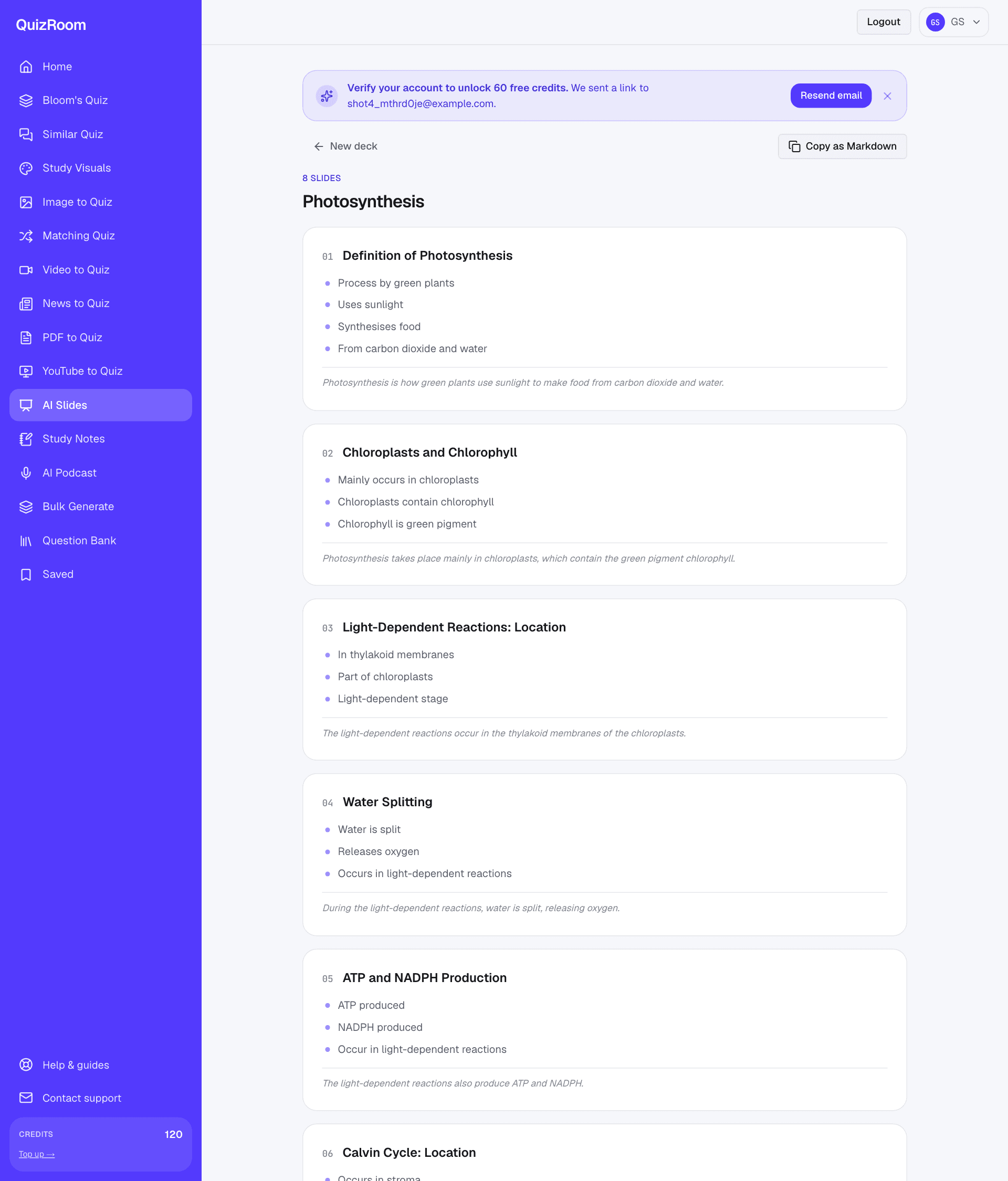
Building slides from a chapter is the kind of work that eats an evening: read the material, decide what matters, cut it to bullets, and fight the urge to paste whole paragraphs onto a slide. An AI slides generator should do the first draft of that for you — but only if it stays faithful to your source and gives you a deck you can actually present, not a wall of text. This guide shows how to turn any source into a clean, grounded deck in about a minute.
- ✓A good deck is one idea per slide, a clear heading, and 3–5 tight bullets — never full paragraphs.
- ✓QuizRoom drafts slides only from the source you give it, so the deck follows your material and adds nothing it can't support.
- ✓You get a title, content slides with bullets and optional speaker notes — copy it straight into PowerPoint, Keynote or Google Slides as Markdown.
- ✓From the same source you can also make notes and a cited quiz — lecture material and its assessment in one place.
What separates a usable deck from a text dump
Most auto-generated decks fail the same way: too many words per slide, and points that drift from what the source actually said. A deck you can stand in front of has a short list of traits:
- ●One idea per slide, with a heading that states it — so the audience knows the point before they read the bullets.
- ●Tight, parallel bullets (3–5), phrases not sentences, each a single beat you'll talk to.
- ●Speaker notes that carry the detail, so the slide stays clean and you still have your script.
- ●Grounded in the source — nothing invented, so a fact-check never embarrasses you mid-talk.
How QuizRoom builds your deck
QuizRoom reads and indexes your source sentence-by-sentence first — the same grounding engine behind its cited questions — then drafts each slide from that indexed text. The deck follows your material's real structure, and every bullet traces to something you actually gave it.
Your source is read and indexed before a single slide is drafted — so the deck reflects your material, not a template.
Make your deck in three steps
- 1Bring your source
Paste text, upload a PDF or DOCX, or drop a URL. QuizRoom reads it and numbers every sentence.
- 2Set the slide count
Choose how many content slides — 5 for a lightning talk, 12+ for a full lecture. QuizRoom paces the material to fit.
- 3Review, then export
Slides arrive in seconds with headings, bullets and notes. Copy as Markdown into PowerPoint, Keynote or Google Slides and restyle to your template.
Teaching from these slides? Generate a cited quiz from the same source and you have an entry ticket or exit check that lines up exactly with what you presented — no separate prep.
| Typical AI deck | QuizRoom deck | |
|---|---|---|
| Slide density | Paragraphs pasted in | One idea, 3–5 tight bullets |
| Faithfulness | May drift or invent | Only from your indexed source |
| Handoff | Locked format | Copy as Markdown → any tool |
Is the AI slides generator free?
Yes — new accounts get 60 free credits after a one-tap email verification, enough to draft several decks before you decide to top up.
Can I export to PowerPoint or Google Slides?
Yes — copy the whole deck as clean Markdown in one click and paste it into PowerPoint, Keynote, Google Slides or any tool that imports Markdown, then apply your template.
Will it invent facts to fill slides?
No. QuizRoom drafts only from your indexed source, so a slide never contains a claim your material doesn't support.
How many slides can it make?
Set the count yourself — a handful for a short talk up to a couple of dozen for a full lecture; QuizRoom paces the source to fit.
Turn your first source into a slide deck
Paste a chapter or paper and get a clean, source-grounded deck in about a minute. Free with 60 credits.
Start free — 60 creditsBuilds the generation pipeline behind QuizRoom, including the citation check that rejects any question it can't trace back to your source. Previously shipped ingestion and OCR systems at two edtech companies.